Windows EXE
Best first download for normal Windows friend-feedback testing.
Jump to EXE
TAHAI Web Services Browser 1.8.30 RC
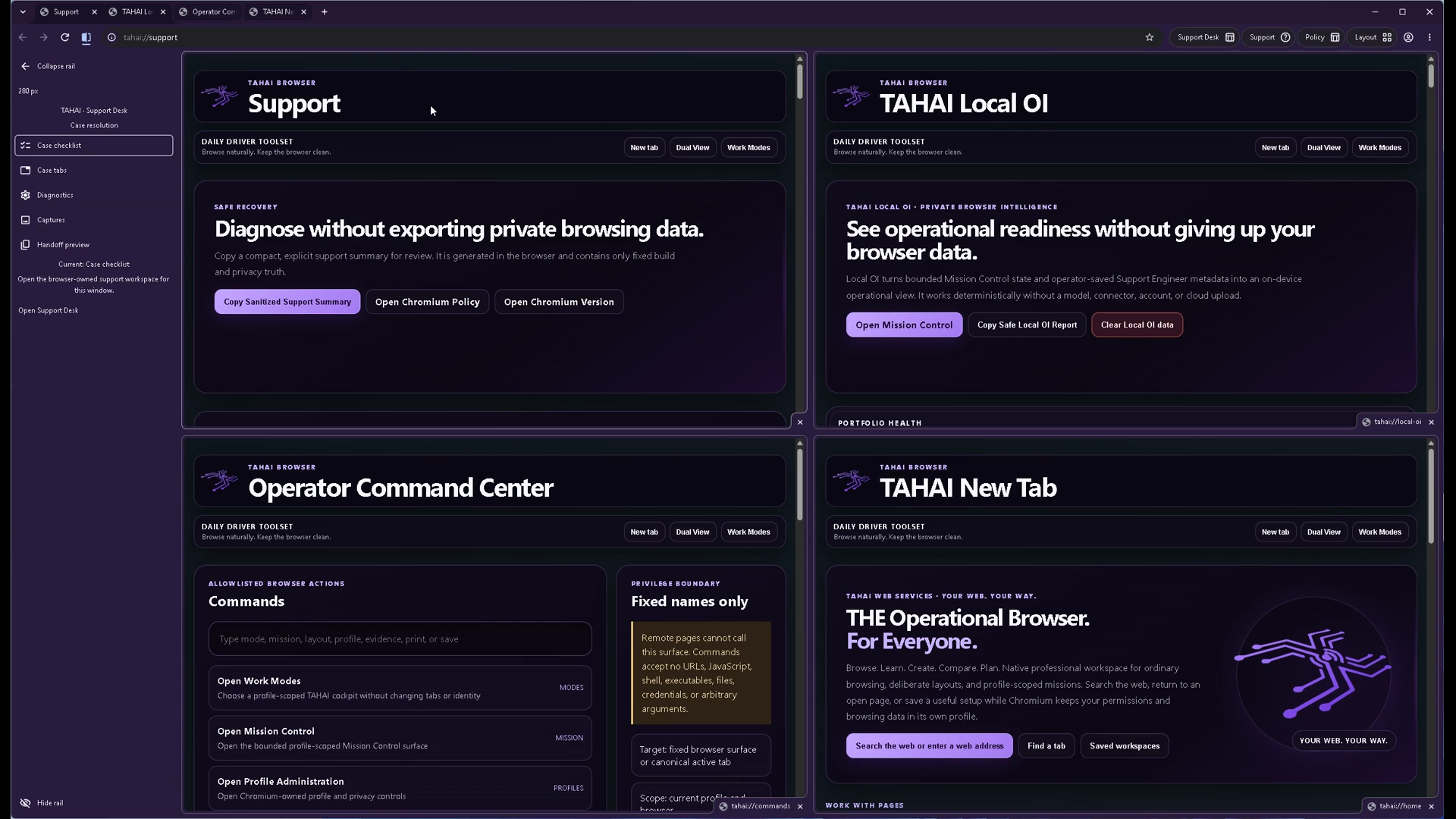
A Chromium-compatible IT/DevOps command browser with Mission Control, Quad View, launch recipes, runbook rail, evidence packets, redacted mission export, and hardened Windows installers.
Operator release console
Current artifacts are unsigned preview/test packages. The website keeps checksums, manifests, policy pages, and docs here while large binaries route to GitHub Releases because Cloudflare Pages static assets should not carry the 120 MB+ installer payloads.
Choose your package
The current 1.8.30 lane is honest by design: Windows installers are the primary RC path, Linux packages are test/pipeline artifacts, and local source builds remain the highest-confidence path while signing matures.
Best first download for normal Windows friend-feedback testing.
Jump to EXEUse when you want the Windows Installer package route.
Jump to MSIUse only as unsigned Linux test artifacts until packaging validation is fully proven.
Jump to LinuxInspect the open-source repo, install dependencies, run checks, and build from source.
Build pathPrimary downloads
These are the newest Windows preview installers and Linux x64 test packages. They are still unsigned. Verify the SHA-256 checksum and use the GitHub repository if you want to inspect or build locally before running.
Windows x64 EXE installer for the current Mission Control release candidate. Best first pick for friend-feedback testers.
4eff7e9ff6b652bf5428a10f91930bd4c4e4ade13e550c8b81992c74fb38c662
Download v1.8.30 RC EXE
EXE SHA-256
MSI package for Windows Installer workflows and deployment-style testing.
da901e616874ef1b03bef74ef0c2d155a0d4577fd151b83c5fd76c4b7ff1ef94
Download v1.8.30 RC MSI
MSI SHA-256
Portable Linux AppImage test package for x64 workstations. Unsigned preview/test artifact.
7b2aa2ffb6a784239dbe306c26cfc85e2f1d462c7d249486ffa255bc99e21143
Download v1.8.30 AppImage
AppImage SHA-256
Debian/Ubuntu-style Linux package for install-path testing. Unsigned preview/test artifact.
a2b8359669d3607c164277781b9e975ae782e60162de5688ee5630ec266df92b
Download v1.8.30 DEB
DEB SHA-256
Fedora/RHEL-style Linux package for install-path testing. Unsigned preview/test artifact.
8ad5262cb4004f76eb8807beaf58e2cae5306d5e5ee43fafc97baf2355c5f721
Download v1.8.30 RPM
RPM SHA-256
Large artifact note
Windows and Linux packages for 1.8.30 are larger than a normal static-site asset. This site keeps the public download paths, release manifests, and SHA-256 verification details in place. If a GitHub release asset is not live yet, use the GitHub repository to inspect the source and build locally while the release asset is published.
Open-source release hosting
Cloudflare Pages serves this website, documentation, checksums, screenshots, and release manifests. The large Windows and Linux binaries are intended to live on the public GitHub release tags. The browser remains open source, so testers can inspect the source and build locally instead of trusting an unsigned preview binary.
Current Mission Control RC: Windows EXE/MSI plus Linux AppImage, DEB, and RPM test packages.
Open v1.8.30 releaseThe project is Apache-2.0 open source. Builders and engineers can clone the repo, run the release-blocker checks, and create a local build.
Open source repoEach download card and release manifest lists the exact SHA-256 hash to compare after download.
Open SHA256SUMSgit clone https://github.com/JTAHAI/tahai-web-services-browser.git
cd tahai-web-services-browser
npm ci
npm run build
# Windows packaging, unsigned preview mode:
$env:CSC_IDENTITY_AUTO_DISCOVERY = "false"
npm run package:win:release
# AppImage
chmod +x TAHAI-Web-Services-Browser-1.8.30-x64.AppImage
./TAHAI-Web-Services-Browser-1.8.30-x64.AppImage
# Debian / Ubuntu
sudo apt install ./TAHAI-Web-Services-Browser-1.8.30-x64.deb
# Fedora / RHEL-style systems
sudo dnf install ./TAHAI-Web-Services-Browser-1.8.30-x64.rpm
Quick tutorial
This is the clearest way to understand the product direction: normal browsing stays clean, then Ops Mode becomes Mission Control when you need a real technical workbench.
Click Mission in the browser toolbar. Create a named mission such as DNS Migration Cockpit and select the migration mission type.
Use Launch Recipes to select DNS Migration Cockpit. The mission keeps the workspace local-first, recovery-safe, and redaction-aware.
Open the Cloudflare console, DNS propagation checker, vendor docs, and TAHAI IT Docs/runbook tab. Then use Make Quad From Tabs.
Use the four-pane workbench for primary console, monitoring, docs, and runbook. Address bar, reload, back/forward, and command actions route to the active pane.


What is new
Mission Tabs, named operational workspaces, Mission Views, Mission Tools, and Mission Evidence. Normal browser stays clean; Ops Mode becomes Mission Control.
1-Up, 2-Up split view, 3-Up triad, Quad View, and Focus Pane with active-pane routing for address bar, reload, back/forward, and commands.
Prebuilt workspaces for AWS, Azure/Entra, M365, Google Admin, Cloudflare, GitHub, Vercel, incident response, DNS migration, deployment, IT admin, and support scenarios.
Local checklist, notes, steps, stop/rollback condition, and timeline for deployment/change windows, incidents, migrations, and documentation passes.
Mission captures include URLs, titles, timestamps, pane roles, notes, and mission context with redacted copy/save packet flow.
Restore can preview only, open alongside current tabs, or replace current tabs instead of being destructive by default.
Breadcrumbs, open folder as tabs, add current page, subfolders, delete confirmation, duplicate filtering, unsafe URL blocking, and export manifest.
Browser-side references only. No PSA secrets or direct PSA APIs. Future writeback routes through IT Docs-authorized server-side connectors.
Credential Vault removed from public browser lane, trusted first-party sender checks added to IPC, source cleanliness verifier added, and local pages moved away from unsafe inline allowances.
Browser-safe renderer bundle repair, boot watchdog, asset preflight, and preload/DOM-ready diagnostics help prevent silent startup hangs.
About page links TAHAI, browser site, GitHub, IT Docs, SENTINEL, and TAHAI OS. Ops Panel recipe pill overlap and SENTINEL logo bleed were repaired.
Windows EXE/MSI installers and Linux AppImage/DEB/RPM test packages are now listed for 1.8.30. All current artifacts remain unsigned preview/test builds while code signing and packaging hardening continue.
Unsigned preview guidance
The current installers are unsigned while the open-source repo, public build verification, and code-signing path mature. Windows, Edge, or Chrome may ask whether to keep or run the file. Proceed only when you intentionally downloaded it from the official site and the SHA-256 hash matches.
Use browser.tahai.net, browser.tahaiportal.com, or the official GitHub repository.
Run Get-FileHash and compare it to the checksums on this page.
The browser is open source. You may inspect the repo and create your own local build before running preview installers.
Unsigned preview builds may trigger SmartScreen or browser keep-file prompts until code signing is completed.
SHA-256 verification
4eff7e9ff6b652bf5428a10f91930bd4c4e4ade13e550c8b81992c74fb38c662da901e616874ef1b03bef74ef0c2d155a0d4577fd151b83c5fd76c4b7ff1ef947b2aa2ffb6a784239dbe306c26cfc85e2f1d462c7d249486ffa255bc99e21143a2b8359669d3607c164277781b9e975ae782e60162de5688ee5630ec266df92b8ad5262cb4004f76eb8807beaf58e2cae5306d5e5ee43fafc97baf2355c5f7214e4e9d2bc9073633652d688303685c98c8283d0c55988e7efb01ece67492d7363abf80b623b8c17a92e7f2d04b5bc13daa73d2d9529e41259633565e3fb7c3cdac9f806ca6f47d27025eee7baa76b9ff8207f45094e364be1522bf0f39970d5db6d2ea10cebe6d03f153d140f3f83188ceaa6e980e771b611493d0741c4dcab3fbcd1caf82ddf8d64729c084e3ecb55414c8c68a8747aec2fd9e4618bb5ee619Get-FileHash "$env:USERPROFILE\Downloads\TAHAI-Web-Services-Browser-1.8.30-x64.exe" -Algorithm SHA256
Get-FileHash "$env:USERPROFILE\Downloads\TAHAI-Web-Services-Browser-1.8.30-x64.msi" -Algorithm SHA256
Get-FileHash "$env:USERPROFILE\Downloads\TAHAI-Web-Services-Browser-1.8.30-x64.AppImage" -Algorithm SHA256
Get-FileHash "$env:USERPROFILE\Downloads\TAHAI-Web-Services-Browser-1.8.30-x64.deb" -Algorithm SHA256
Get-FileHash "$env:USERPROFILE\Downloads\TAHAI-Web-Services-Browser-1.8.30-x64.rpm" -Algorithm SHA256
Get-FileHash "$env:USERPROFILE\Downloads\TAHAI Web Services Browser-1.8.6-win-x64.exe" -Algorithm SHA256
Get-FileHash "$env:USERPROFILE\Downloads\TAHAI-Web-Services-Browser-1.8.0-x64.exe" -Algorithm SHA256
Get-FileHash "$env:USERPROFILE\Downloads\TAHAI-Web-Services-Browser-1.8.0-x64.msi" -Algorithm SHA256Older builds remain available
Earlier Quad-view test build. The 1.8.30 RC now gets the main fanfare.
Download v1.8.6 Quad-view test EXEOriginal public Windows EXE preview lane.
Download v1.8.0 EXE previewOriginal public Windows MSI preview lane.
Download v1.8.0 MSI previewRelease path